Network Monitoring System NMS
Unified Network Monitoring System for Real-Time IT Infrastructure Control
Unified Network anagement & Infrastructure Monitoring
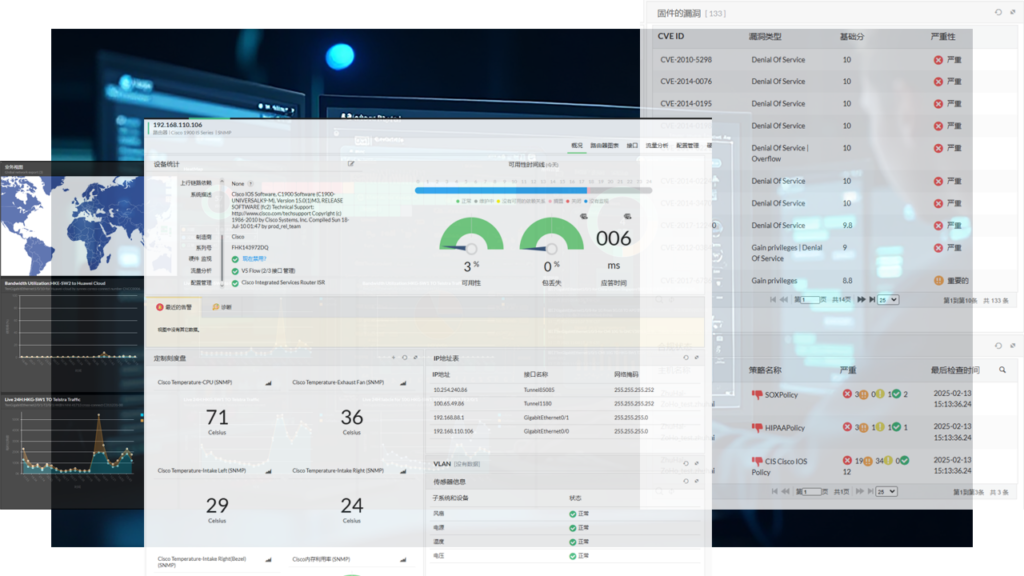
CN Care NMS delivers comprehensive, real-time visibility and control over your entire network infrastructure. Our integrated platform provides network administrators with a centralized console for managing routers, firewalls, servers, switches, and printers, ensuring optimal performance, security, and reliability for your business operations.
Comprehensive Features for End-to-End Network Control
_NMS-1024x1024.png)
Infrastructure
Performance
Monitoring
Performance
Monitoring
Ensure optimal performance and uninterrupted operations
with active and passive monitoring technologies.
Our NMS connects via bypass mode
for non-intrusive, real-time insights.
_NMS-副本-1024x1024.png)
Advanced Bandwidth Management & Traffic Analysis
Optimize network performance with deep traffic analysis and granular bandwidth control.
_NMS-副本-2-1024x1024.png)
Network
Configuration
& Compliance Management
Configuration
& Compliance Management
Maintain network stability and security
through automated configuration
and compliance auditing.
_NMS-副本-3-1024x1024.png)
Automated
Administration
& Workflows
Administration
& Workflows
Streamline operations with custom, automated actions
that reduce manual intervention
and mean time to resolution (MTTR).
_NMS-副本-4-1024x1024.png)
IP Address & Switch Port Management
(IPAM & SPM)
(IPAM & SPM)
Organize and secure your network foundation
with specialized administrative tools.
_NMS-副本-5-1024x1024.png)
Gain critical
security and WAN
performance insights
security and WAN
performance insights
Monitor version, authorization, performance,
and track configuration changes.
Visualize logs for security risk analysis.
Customizable Dashboards & Reporting
Gain immediate situational awareness with a powerful overview view.
Customizable Dashboards:
Tailor views to display immediate device status, CCTV feeds, business views, and key reports.
Out-of-the-Box Graphs & Reports:
Access a wealth of pre-built analytics on network, server, and application health.
Actionable Intelligence:
Transform data into decisions with detailed, exportable reports on performance and capacity.
_NMS-副本-6-1024x1024.png)
Performance monitoring
- Device availability
- Available response time
- CPU, memory and disk
- Device errors and packet loss
- Network traffic, bandwidth
_NMS-副本-7-1024x1024.png)
Bandwidth Management
- Identify performance problems caused by hardware errors
- Monitor power supply
- Monitor temperature
- Monitor voltage
- Monitor resource capacity
_NMS-副本-8-1024x1024.png)
Network
Configuration Management
Configuration Management
- Monitor CPU, memory, and disk utilization
- Monitor Windows processes and services as well as TCP services
- Monitor Windows events through event ID
- Monitor file size, presence, quantity and modification
_NMS-副本-9-1024x1024.png)
Firewall monitoring
- Firewall version, authorization, performance monitoring
- Keep a record of firewall configuration and changes
- Analyze security risks through firewall log visualization
_NMS-副本-10-1024x1024.png)
Stability monitoring
- Visualize WAN links
- Monitor Voip link jitter, delay, and packet loss
- Analyze historical trends Measuring and improving availability planning
Address and Port Management
NMS provides a variety of tools commonly used by network and system
administrators, including IP address management, switch port management,
external device monitoring, IPAM and SPM reports, etc.
administrators, including IP address management, switch port management,
external device monitoring, IPAM and SPM reports, etc.
IP address administration
Actively discover, monitor and manage IPV4 and IPV6 addresses
Draw a tree analysis layer Scan the subnet to obtain IP status
Draw a tree analysis layer Scan the subnet to obtain IP status
Interface management
– Automatically scan and identify ports
– Monitor the flow status of the interface
– Analyze interface traffic types
– Configure interface availability threshold alerts
– Monitor the flow status of the interface
– Analyze interface traffic types
– Configure interface availability threshold alerts
IPAM & SPM report
IPAM report: A report of available and used IP addresses in the network.
SPM report: network port availability report, port utilization, speed and type, etc.
SPM report: network port availability report, port utilization, speed and type, etc.
Bandwidth Management and Traffic Analysis
NMS collects and analyzes traffic from critical devices, helping you delve into traffic analysis and perform effective bandwidth management, providing detailed traffic reports. Supported device types: Cisco, H3C, Juniper, Ruijie, Sangfor, HP, Huawei, and other leading suppliers in the market. Supports protocols such as Netflow, Sflow, j-flow, IP fix, Netstream, and Appflow.
Bandwidth management
Determine the source of traffic consumption according to application, source and destination IP address, interface and protocol, adjust traffic through policy, and then predict future bandwidth capacity.
Flow analysis
Track application, device, and interface traffic to generate detailed views, and provide network path tracing and periodic performance analysis.
Network Configuration Management
Network configuration management is a comprehensive network device configuration change and compliance management solution that provides unified and centralized security management of network devices such as switches, routers, and firewalls.
Firmware vulnerability monitoring
Compliance management
Automated Administration
The NMS system supports custom configuration workflows. When a status, process, application, file, or other event occurs on a custom device, it can trigger custom internal alarms, processing actions, external software actions, or configuration actions. For example, the following scenario illustrates this:


Tiered Support
HELP DESK & INCIDENT MANAGEMENT TIERS
For any incidents, we immediately get into action, open up a conference bridge, liaise with all the involved parties for resolution, and send regular updates to business and IT stakeholders, based on the escalation matrix. The following are the different tiers of support our Help Desk offers.
Tier-1
Support
It is backed by a generalist NOC Technician with a broad understanding of a part(s) of the IT and network infrastructure under management.
Basic support and troubleshooting, such as password reset, printer configurations, break/fix instruc tions, ticket routing, and escalation to Tier-2 and Tier-3 support.
Basic support and troubleshooting, such as password reset, printer configurations, break/fix instruc tions, ticket routing, and escalation to Tier-2 and Tier-3 support.
Tier-2
Support
Tier-3
Support
Expanding your network horizons
Ready to Upgrade
Your Business Connectivity?
Contact us today for a consultation
and get a tailored quote for your enterprise broadband solution.
and get a tailored quote for your enterprise broadband solution.
(852) 2138 9398
Location
Hong Kong
Suite 3606, 36/F, No. 39 Wang Kwong Road,
Kowloon Bay, Kowloon
Kowloon Bay, Kowloon
Shenzhen
10A21, Dongle Building, No. 2019-2 Shennan East Road,
Xinnan Community, Nanhu Street, Luohu District, Shenzhen
Xinnan Community, Nanhu Street, Luohu District, Shenzhen
Guangzhou
Units 104-106, Block B, Guangzhou Venture Capital Town,
Haizhu District, Guangzhou City
Haizhu District, Guangzhou City
Zhuhai
Rooms 1303-1305, 13th Floor, Windsor International Building,
2083 Jida Jiuzhou Avenue Middle, Xiangzhou District, Zhuhai City
2083 Jida Jiuzhou Avenue Middle, Xiangzhou District, Zhuhai City
Shanghai
Room 312, Building F, Zhonghai Center,
No. 1256 Caoyang Road, Putuo District, Shanghai
No. 1256 Caoyang Road, Putuo District, Shanghai